Negative Title
Negative Title: This video contains how to use negative title for chart in OPNBI.
tip
Only users with Dashboard privilege have access to this section!
Read 5 minutes tutorial here.

Click on hamburger icon.

Click on dashboard tab and open Line Chart in edit mode.

The Edit menu box appears as you click on Line chart icon. And a widget gets added in content place automatically in dashboard.
In Formatting Property click on Value Axis Property.
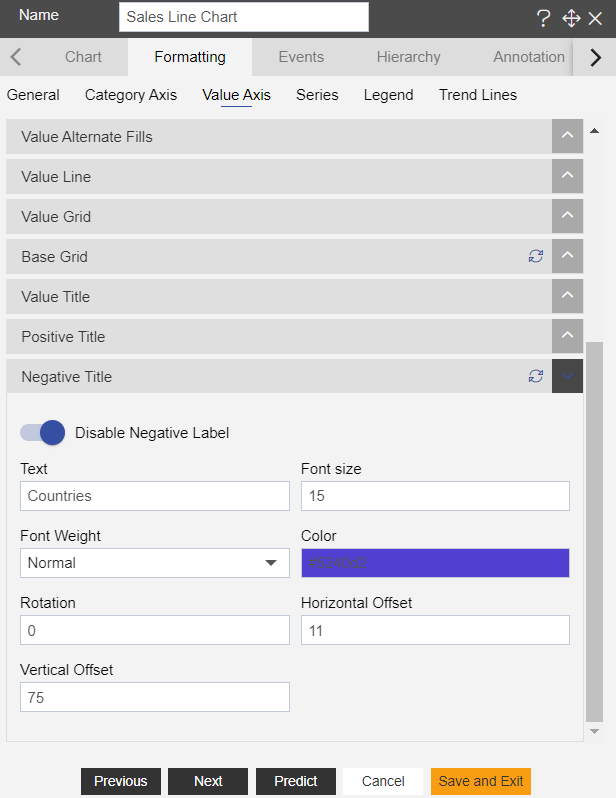
Enter Following details in Negative Title Property:
- Toggle Enable Negative Title
- Text: Countries
- Color: #5240d2
- Rotation: 0
- Horizontal Offset: 11
- Vertical Offset: 75
Fill above details in edit box, As Shown in figure:
Click on Preview and Save and Exit.
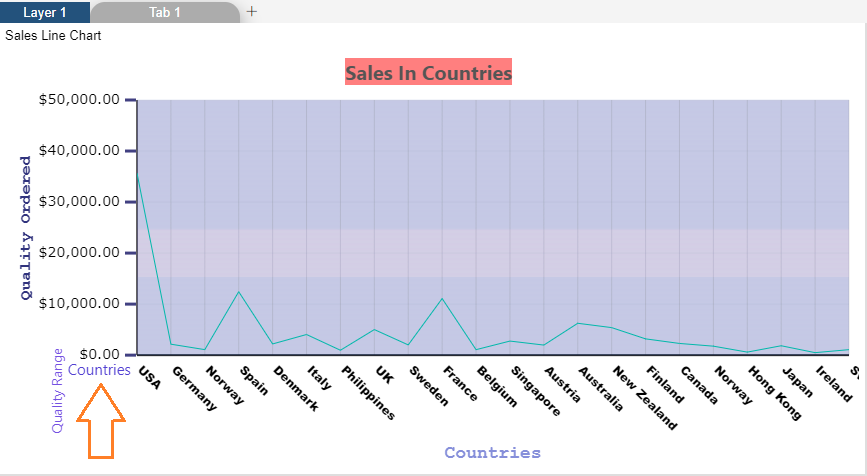
Now, match your Line chart with the below example, it should look like the figure below:
To know more about other Value Axis properties click on below links:-